
LodgeiT's Share Register and Franking Account tools automate dividend tracking and imputation credits for company tax returns. Franking ensures dividends carry tax credits, avoiding double taxation; balances must stay non-negative per ATO rules.
Key Concepts:
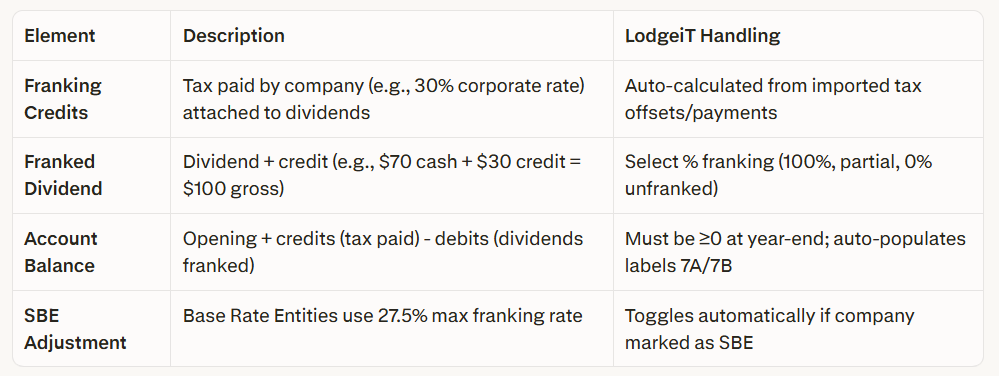
The video provides the following guide to using the Share Register & Franking Account -
- Access Tools: Client file > Share Register > Create share classes/members if needed.
- Franking Account: Add opening balance, then import ATO tax transactions (Income Tax Account/Instalments).
- Record Dividends: Select members, enter amount/date, set franking %—auto-debits franking account.
- Validate: Run form checks; flows to Company Tax Return (Labels 7A–7C, 10A–10C)
Related Article:
How to use the Share Register & Franking Account
In the Financial Information Section, franking account must be positive or zero. Not negative.

