
Prompt: CMN.ATO.AS.EM060
Solution:
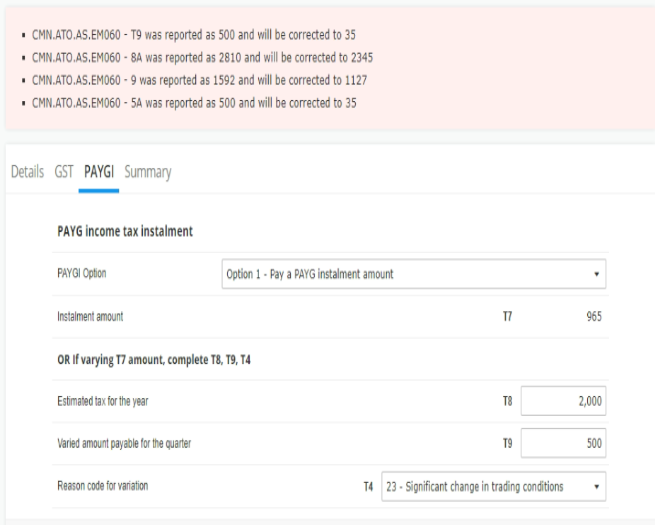
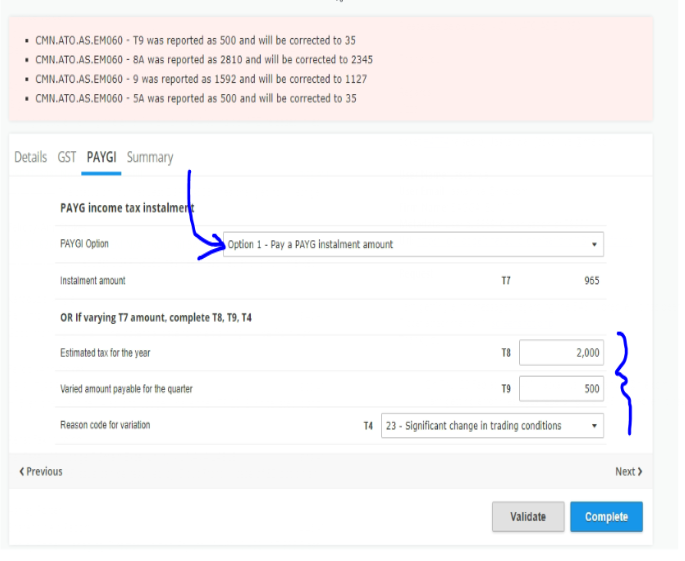
User should select the appropriate PAYGI Option. It's not possible to report both the instalment amount and the varied amount. It says - OR IF varying T7, complete T8,T9,T4
CMN.ATO.AS.EM060 – was reported as and will need to be corrected as Reason code 1012.
Solution: When the GST reporting option is 3 (GST instalment), the following fields should not be provided,
- G1 - Total sales
- G2 - Export sales amount
- G3 - Other GST-free sales
- G10 - Capital purchases
- G11 - Non-capital Purchases
- GST included in total sales indicator (G1 includes GST)
If the issues persist, please check:
If the IAS form is past due, you won’t be able to vary the installment amount. In such cases, please contact the ATO.
If the ATO is unable to assist, please make the necessary adjustment at year-end.
Question: How to remove the pre-populated info provided by ATO. How do I delete the pre-fill Instalment amount?
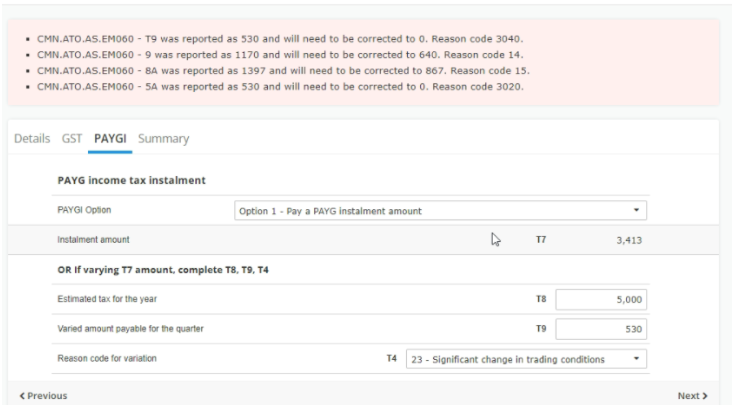
PAYG Instalment Example (Quarter 2)
ATO Calculation Formula:
(Estimated annual tax × 50%) − Varied amount from previous quarter
Example:
Estimated tax for the year: 5,000
Varied amount from previous quarter: 3,413
Calculation: (5,000 × 50%) − 3,413 = −913
Since the result is negative, ATO rules require:
T9 must be reported as 0
This is why the ATO validation error appears if a negative value is entered.
Less GST instalment already paid (September quarter): 19,931
Calculation: 10,522 − 19,931 = negative value
As per ATO rules, the varied instalment amount must be 0.
Important Notes
The ATO may automatically recalculate instalment amounts in future BAS periods.
If the business has ceased or structure has changed, the remaining instalment amount (e.g. 1,113) may require direct confirmation from the ATO.
In such cases, advise the user to contact the ATO directly for guidance on final instalment obligations.


GST Instalment Example
BAS Oct-Dec G23
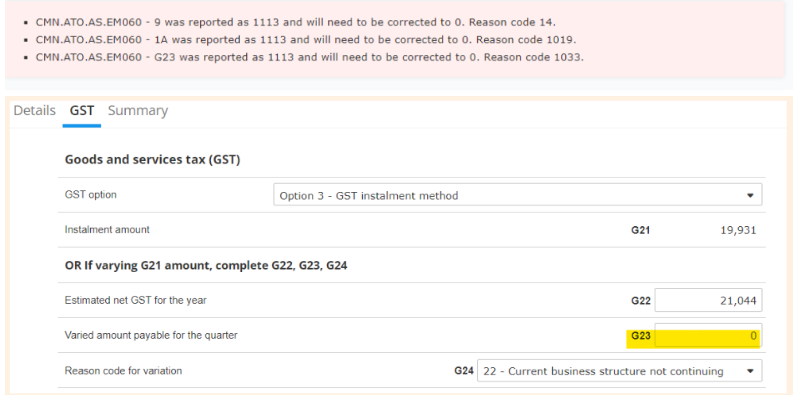
This is ATO side validation. ATO has the guide how to vary and calculate instalment amount- https://www.ato.gov.au/businesses-and-organisations/gst-excise-and-indirect-taxes/gst/in-detail/managing-gst-in-your-business/reporting-paying-and-activity-statements/gst-instalments/varying-your-instalment-amount
According to it the calculation are following:
Estimated annual GST liability = 21,044
Amount to be paid by December quarter (21,044 × 50%) = 10522
less GST instalment amount paid for September quarter = 19,931
Varied instalment amount for December quarter = 10522 - 19,931 = less than zero
Since the result is negative, the correct varied instalment amount is 0.
This explains why the system displays an error during pre-lodge or lodge if a non-zero value is entered.
ATO Reference: Varying your GST instalment amount
Important Note
If the business is no longer continuing or the remaining instalment amount (e.g. 1,113) needs to be worked out differently, the user must contact the ATO directly for guidance on how to correctly finalise the instalment obligations.