
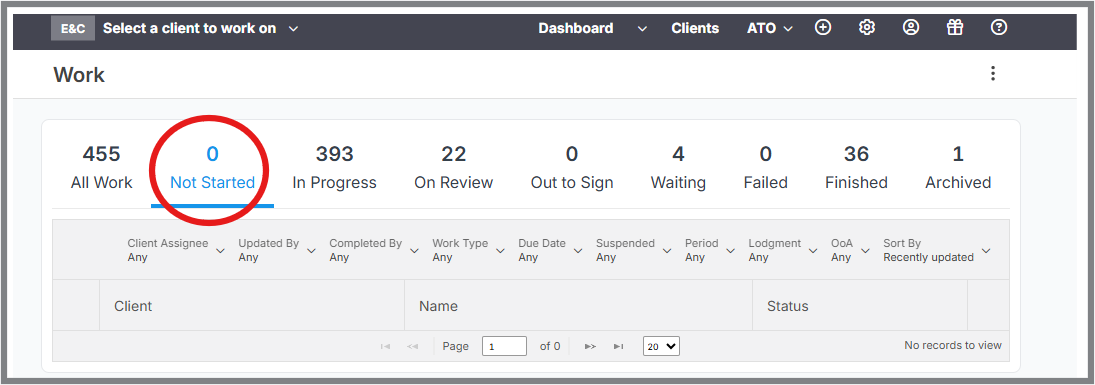
Illustration: The tax returns are not loading dynamically from my ATO lodgment list into the “Not Started” tab. I’ve had to create the new forms manually.
Why This Happens
If new tax return forms are not pulling automatically from your ATO lodgment list, it’s usually because the Software ID connection hasn’t been tested or disconnected.
How to Fix It
Follow these steps to restore automatic syncing:
Go to your Software ID settings page:
https://go.lodgeit.net.au/settings/software_id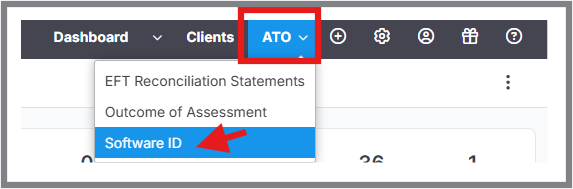
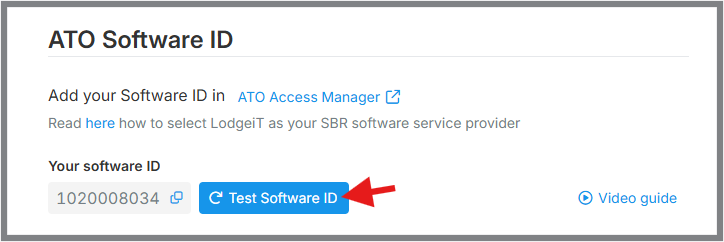
Click the “Test Software ID” button.
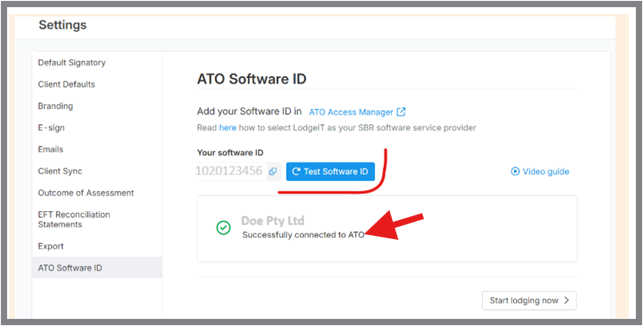
Wait for the confirmation that the connection is successful.
What Happens Next?
Once the Software ID test is completed successfully:
Lodgeit will automatically resume pulling new tax return forms.
Syncing typically occurs every 3–5 days.
New returns will appear under the “Not Started” tab without manual creation.