
Once the form lodged and received by the ATO, Lodgeit automatically starts checking its lodgment progress status on the ATO on a daily basis.
You can check the lodgment status either on the form or you hover over the status on the "Form Dashboard"


Processing won’t necessarily be immediate, the timing depends on ATO workload, complexity of the form, or whether they need to do additional verification.
Status
- Lodgement is "Cancelled". When the ATO marked the form as "Cancelled".
- Lodgment is "Missing". It indicates that the lodgment did not went through the ATO system and was lost somewhere on the ATO side
FORM STATUS:
Pending
The forms was received by the ATO processing system and was queued to be checked by Lodgeit.
Processing
It indicates that the form successfully went through the ATO system and was received by the agency. It's currently being processed by the ATO. Please note, at this stage, the lodgment might not be shown on the ATO portal, processing times can vary based on several factors (It might take up to a month for a lodgment to be processed by the agency). For the most accurate and up-to-date information regarding your specific situation, we recommend contacting the Australian Taxation Office (ATO) directly. The Tax Practitioner Assistance Line is 13 72 86, select fast Key codes 3, 2, 1 between 8.00am and 6.00pm, Monday to Friday, excluding public holidays.

Processed
The form was successfully processed by the agency. Now you must be able to see it on ATO portal.

ATO: Queued
The return has been lodged and accepted by ATO’s system, but it's not yet under active processing. Learn more here
Lodgement is Missing on ATO
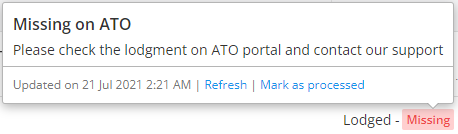
First, check the ATO portal to confirm whether the form has been successfully lodged. If it shows as “Lodged”, you can mark the form as lodged in Lodgeit.
Guide: How to "Mark form as lodged manually"
Check the ATO portal, to see the latest form status. If form does not show as "Lodged", the best action and immediate response is to contact the ATO directly.
Lodgeit can contact them on your behalf, but please note that this may take 1–2 weeks.
Not Lodged
Error
Usually, it indicates that Lodgeit cannot connect to the ATO and check the lodgment. You can read the error reason on the form or the dashboard.
The most common error is CMN.ATO.AUTH.011 - The client you transmitted is not associated with the agent number you supplied and cannot be authorised. In such case, you should either associate the clients with your agent number or just click Mark as processed if you are sure the lodgment was processed and you don't want to see the error.

Cancelled
Try to "unlock" the form and re-lodge again, learn more here
or
The lodgment was cancelled by the ATO for some reason. You must contact the ATO directly. The Tax Practitioner Assistance Line is 13 72 86, select fast Key codes 3, 2, 1 between 8.00am and 6.00pm, Monday to Friday, excluding public holidays.

Related articles: