
Open the Form and press the Print Icon -

Then, tick the box whichever is necessary -
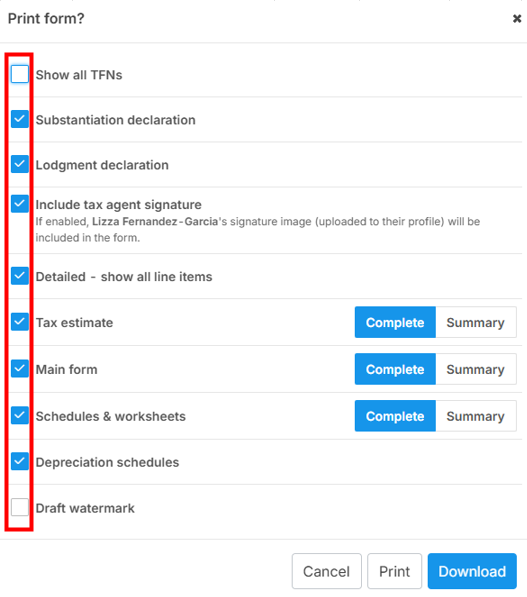
NOTE: To include the "tax agent signature" in the printed pdf copy of the tax form, simply check the option "Include tax agent signature" option under the "Print form?" options. If you need both the tax agent and client signatures to appear on the printed copy, you must select "Include tax agent signature" when sending the e-signature request.
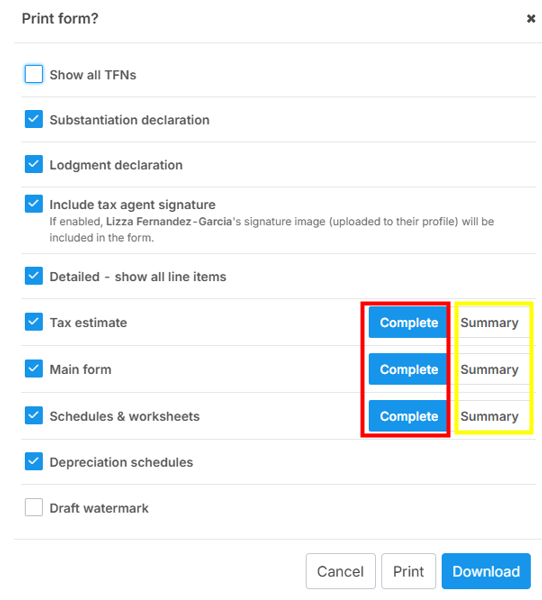
Finally, choose either the "Complete" or "Summary" view.
Note: You can also download signed documents on iPhone and Android mobile devices.
Related guides:
How to get signed copy of the client tax return with e-signature?
How to display the Tax Agent's signature on the tax form?