
Scenario
Your firm is under the LodgeiT Pro Advisor program and receives free lodgements through the QuickBooks Online (QBO) integration. However, your practice primarily prepares financials using another accounting software, such as Xero, rather than QuickBooks.
Solution
To continue maximizing your Pro Advisor subscription while using financial data from Xero, Excel, or another accounting platform, we recommend creating a duplicate client record within LodgeiT.
Steps
1. Create a new client in LodgeiT that will be used for tax returns prepared from Xero, Excel, or other non-QBO sources.
2. When creating the new client, do not enter the ABN or TFN initially. 
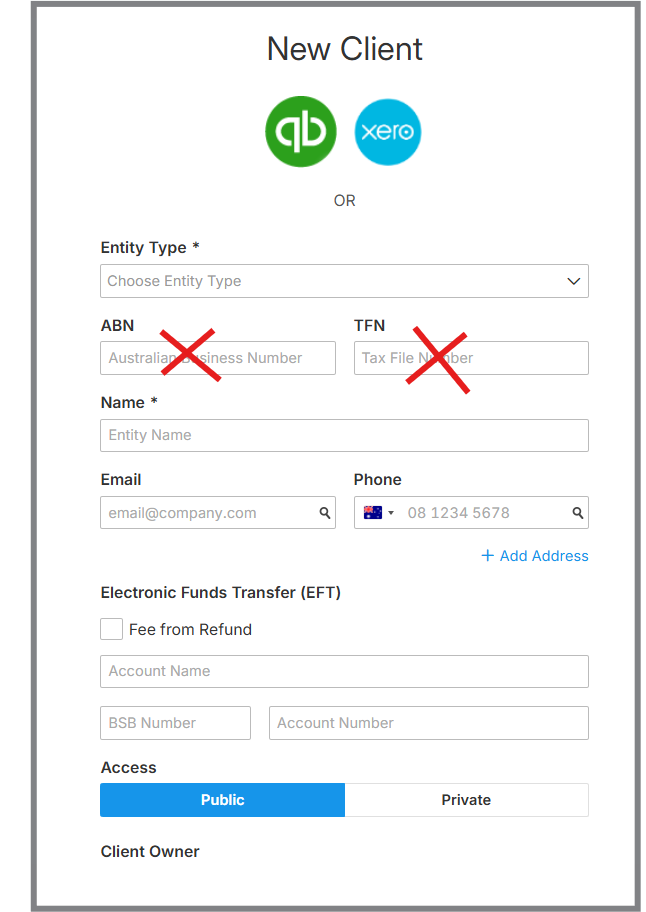
3. Once the duplicate client has been successfully created, you may then update the client record and add the ABN and TFN details.
4. Use this new client record for all future financial imports and tax work that are not sourced from QuickBooks Online.
Benefits
- Eliminates the need to repeatedly disconnect and reconnect the QBO integration.
- Keeps financial and lodgment records separate.
- Allows your firm to continue benefiting from the Pro Advisor subscription and free lodgements.
- Provides a dedicated client record for financials prepared from Xero, Excel, or other accounting software.
- Simplifies your workflow and reduces the risk of integration-related issues.
Important: Ensure that the duplicate client is created without an ABN and TFN initially. These details can be added after the client record has been successfully created.